?

3D Square-1 Puzzle Simulator

Play with the shape-shifting Square-1 on your computer or on your phone.

Drag the top or bottom layer to turn it - it snaps to 30° steps. Drag the thin middle band, or press the Slice button, for the / move.

Drag next to the puzzle to rotate the view. Keyboard: U and D turn the layers (with Shift for the other direction), /, S, L or R is the slice.

Online Solver
×
Error messages appear here when the puzzle is not colored properly.
Your puzzle is shape-shifted. Turn it back to a cube - or press Reset - to paint the net.
Click a sticker to paint it, drag to rotate
00
» 1.2 s/move Back to scramble
?

Square-1 Solver

Paint the colors of your cube-shaped Square-1 onto the net and get a short solution in official (t,b) / notation.

The solver starts from the cube shape: bring your puzzle back to a cube first, then copy the stickers.

Use the palette, the turn buttons or a typed algorithm.

The equator is the reference frame, so it is not paintable - but click it if your middle layer is flipped over.

Stopwatch
?

Square-1 Timer

Practice speedsolving on the Square-1!

Hold your Space button or the clock until it turns green, then release to start. Press again to stop.

With a legal Square-1 scramble generator and instant statistics.

Tutorial
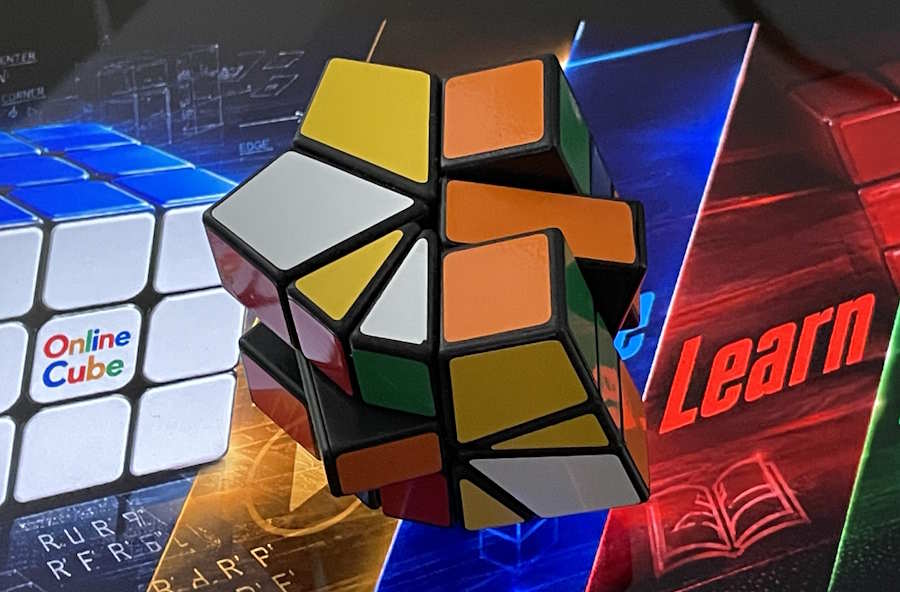
A black Square-1 twisted part-way out of its cube shape, the layers no longer lining up

Every other puzzle asks you to fix the colors. The Square-1 asks you to fix the shape first - and only then the colors. Its top and bottom layers are cut into 60° kite-shaped corners and 30° triangular edges, so a single slice can hand three corners to the other layer and leave you holding something that is no longer a cube at all.

There are about 435 billion positions spread over 170 different shapes, but the road through them is short: six steps, four algorithms, and an afternoon. The method below follows the same steps as the Ruwix Square-1 guide; every algorithm on this page was replayed move by move on our own simulator, so each one is guaranteed to be legal and to do exactly what the text claims.

No puzzle in your hands? Learn the whole thing on the simulator above, then race the timer.

/

How to Read the Moves

Square-1 notation is a pair of numbers and a slash. (t,b) turns the top layer t steps and the bottom layer b steps, where one step is 30°. A positive number turns a layer clockwise seen from outside it - so looking down for the top layer, and looking up from underneath for the bottom one, exactly as U and D work on a cube. On screen that means the two layers sweep opposite ways.

(1,0)
top layer, one step

(3,0)
top layer, 90°

Every picture so far turns the top layer. The bottom one works the same way, but you judge it from underneath - so the sign that looks right from your chair is the wrong one. (0,-1) is a single step of the bottom layer only: counterclockwise seen from below, which is what a clockwise sweep looks like while you are staring down at the puzzle from above.

(0,-1)
bottom layer, one step

That is also why the two halves of a pair so often carry opposite signs: (1,-1) sweeps both layers the same way on screen, because +1 on top and -1 underneath are the same turn seen from two sides.

The lone / is the slice: the right half of the puzzle flips over, so the pieces standing there change layers. That single move is where the shape-shifting comes from.

a solved cube…

…one / later

The slice is blocked whenever a piece sits across the cut - turn a layer one step and try again. Our simulator simply refuses the move and flashes LOCKED, exactly like the real puzzle.

You can type any sequence from this page straight into the solver's algorithm box.

💡

Meet the Pieces

Each outer layer holds 360° of pie. A corner is a fat 60° kite, an edge a thin 30° triangle. Four corners and four edges alternating make a square layer - that is the cube shape.

The middle layer is the odd one out: it never travels, it only ever sits the right way round or flipped over. Treat it as your compass - it is the one thing on the puzzle that cannot get lost.

Hold the puzzle like every picture here: white up, yellow down, orange in front, green on the right, red behind, blue on the left. That is exactly how the simulator starts out.

Corners and edges wander between the layers as they like, so counting pieces is half the battle: a layer with five corners in it cannot possibly be a square.

1

Back to Square One

The puzzle tells you its first move in its own name. It reached the shops in the early nineties as Back to Square One, and Square-1 is only that title worn short - because before a single colour can be sorted, both layers have to be square again. Nothing is solved yet, so there is nothing to spoil: this is the one step where you can push pieces around freely, and the best place to learn how the puzzle actually moves.

Ignore every colour for now and look only at the silhouette.

a shape-shifted mess…

…a cube again

Count the corners. Sixteen pieces are in play: eight fat corners and eight thin edges. A square layer needs exactly four of each, alternating. So count the corners in the top layer - if there are more than four, the surplus has to go down.

Then trade halves. Turn the layers until the half you are about to cut holds the pieces you want to send away, and the half coming back holds the ones you want. One / and they change places. Keep the count at four corners per layer and the shape falls out on its own.

A useful habit: build corner-edge-corner-edge runs in the half you are not cutting, so your good work never crosses the knife.

Work by hand rather than by recipe, and keep going until the wide corner pieces have gathered in one layer and the narrow edge pieces in the other, as far as they will go. Aim to get the narrow pieces sitting next to each other, with at most one left stranded between two corners; that much falls out with a little pushing.

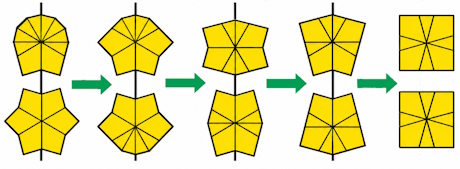
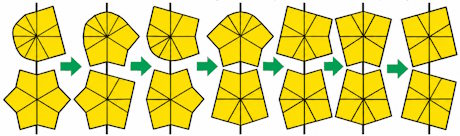
From there you are in one of the two positions below, and the pictures show the rest. Each frame is the two layers seen from above, and the black line marks where the cut runs - so a frame tells you how far to turn each layer before you slice.

Case 1 in five frames: the top and bottom layer outlines seen from above, a black line marking the cut in each, ending with both layers square

Case 1 - every narrow piece is together in the top layer

Case 2 in seven frames: the top and bottom layer outlines seen from above, a black line marking the cut in each, ending with both layers square

Case 2 - one narrow piece sits alone between two corners

Land on something that matches neither picture and the answer is always the same: keep gathering. The narrow pieces want to be neighbours, and only one of them may be left on its own.

When both layers are square, turn them until they line up with the middle layer and you are holding a cube. If the middle layer itself sits skew, leave it - step 6 puts it right.

2

Send the Corners to Their Layers

Now the colors. Forget where a piece belongs inside its layer - for two steps all that matters is which layer it is in. White corners belong on top, yellow corners below.

white and yellow corners mixed…

…all four white corners on top

The slice is a straight swap of two half-layers, so trade a wrong piece for a wrong piece: turn the top until a stray yellow corner sits in the right half, turn the bottom until a stray white corner sits in the right half of the bottom, and cut.

Two corners change places every time, so this never takes more than a handful of slices. Line the halves up so that the run of thick and thin pieces matches on both sides of the cut and the layers stay square while you work.

Do not worry about the order of the corners yet - a white corner in the wrong top spot is a step 4 problem.

3

Send the Edges to Their Layers

Same trick, thin pieces. Every white edge to the top, every yellow edge to the bottom - and this time the corners are already sorted, so keep them where they are.

the edges are still mixed…

…two solid faces

Trade a wrong edge for a wrong edge exactly as before: a yellow edge in the right half of the top, a white edge in the right half of the bottom, one /, done. Because the halves you exchange are the same size, the corners you sorted in step 2 come back to their own layer too.

At the end of this step your Square-1 should show a solid white face and a solid yellow face. Only the side colors are still scrambled - and from here on, nothing ever leaves its layer again.

4

Put the Corners Home

One algorithm does the whole step. It swaps the two front corners of the top layer and, at the same moment, the two front corners of the bottom.

the two front corners are swapped…

…and now they are home

(0,1) / (-3,0) / (2,2) / (1,-2) / (0,-1)

To choose which pair it swaps, turn a layer in 90° steps - (3,0), (6,0), (0,-3) - until the two corners you want to trade are the two facing you. Run the algorithm, and pick the next pair.

It always works on both layers at once. That is not a flaw, it is the puzzle: a lone swap of two pieces is impossible on a Square-1. If one layer's corners fall into place before the other's, swap a pair in the finished layer twice - once to break it, once to mend it.

Read the side colors, not the white face: a top corner is home when both of its side colors match the middle layer under them.

5

Put the Edges Home

The last algorithm, and the twin of the last one: it swaps the front and the right edge of the top layer, and the front and right edge of the bottom layer.

front and right edges swapped…

…solved

(0,-2) / (0,3) / (-1,-1) / (1,-2) / (0,2)

It leaves every corner untouched, so you can turn the layers freely between tries: bring the two edges you want to trade to the front and right positions, fire the algorithm, then turn the layers back so the corners line up again.

Nine solves out of ten, the Square-1 is finished right here.

If you are left staring at two edges and two corners that refuse to go home, you have met the puzzle's famous parity - the next panel is yours.

6

Parity, and the Middle Layer

Both algorithms so far move pieces two pairs at a time, so neither can ever leave you with a single pair out of place. When one turns up anyway, it is not a mistake - it is the Square-1's famous parity.

Two corners and two edges. The common case, and the one with a cure. Hold the odd corners at the front-left and front-right and the odd edges at the front and right of the top layer; this sequence swaps both pairs at once, shape-shifting on the way and landing back on a cube:

(-3,0) / (-3,6) / (-3,0) / (3,0) / (0,-3) / (3,-3) /

Then go back to step 4 and finish normally.

Only two edges - or only two corners. This is the deep one, and it turns up on roughly a third of all scrambles, so you will meet it often. No sequence that keeps the cube shape can fix it: every such sequence moves pieces two pairs at a time, so the puzzle is on the other side of a split that was decided back when you built the shape. Turning the layers differently will not help, and neither will separating them again - both of those keep the cube shape.

Crossing over needs a sequence that deliberately breaks the shape and rebuilds it the other way round. There is no short one; this is the price the Square-1 charges for its extra freedom. Hold the puzzle any way you like and run:

(0,6) / (0,6) / (0,-3) / (2,-5) / (-2,2) / (2,-2) / (4,5) / (-3,5) / (1,-5) / (6,-3) / (0,2) / (2,3) / (-3,6) / (6,4) / (3,6) / (0,-5) / (-3,5)

Seventeen cuts, and it ends on a cube with the white and yellow faces still solid - no piece ever changes layer. Your corners and edges will be shuffled, so go back to step 4 and run through steps 4 and 5 again. You will never need it twice in one solve.

The middle layer. Every piece home but the puzzle still not a cube? The middle layer is sitting the wrong way round - it flips once with every slice, so an odd number of cuts leaves it turned:

(0,6) / (0,6) / (0,6) /

It touches nothing else, so it is safe at any point in the solve.

What Next?

That is the whole method: shape, layers, corners, edges, parity - four algorithms in total. Nothing you learned here expires; speedcubers solve the very same puzzle with the very same slice, they just see more of it at once.

Where to go from here: shave your times on the timer, let the solver show you the short way out of a scramble you are stuck on, and read the Ruwix Square-1 article for the history and the faster methods.

Coming from the cubes? Try the 3x3, the 2x2 or the 4x4 - after the Square-1 they all stand still.

Back to top

Online Square-1 Puzzle Simulator, Solver, Timer and Tutorial

Free online 3D Square-1 simulator, cube-shape solver, speedcube timer and a beginner tutorial.
The Square-1 is the shape-shifting cousin of the Rubik's Cube - the only official speedcubing puzzle that does not even stay a cube.


The Square-1 - also sold as Cube 21 and Back to Square One - was invented by the Czech designers Karel Hršel and Vojtěch Kopský in the early 1990s. At first glance it looks like a strangely sliced Rubik's Cube: the top and bottom layers are cut into kite-shaped corners of 60° and triangular edges of 30°. Because a layer can stop at any 30° step, the vertical slice move can regroup the pieces in countless ways - and the cube stops being a cube after the very first slice. Getting the shape back before the colors is what makes this puzzle unique. If you enjoy puzzles that break the usual layer rules, the diagonal-cutting Skewb is a natural companion.

The numbers are respectable: counting the positions of the corners, edges and the middle layer, the Square-1 has about 435 billion reachable positions spread over dozens of different shapes. It has been an official WCA competition event for decades, and the best solvers need only a handful of seconds per solve.

Shape-shift in the simulator

The simulator at the top of the page is a real, fully geometric 3D Square-1. Drag the top or bottom layer and it follows your finger, snapping to 30° steps; drag the thin middle band - or press the Slice button - and the right half flips over in the / move. Just like on the real puzzle, the slice only works when no piece sits across the cut: if it is blocked, turn a layer a step first. Drag next to the puzzle to rotate the whole view, scramble it with one click and go full screen.

Stuck? The solver knows the way out

Copy the colors of your cube-shaped Square-1 onto the flat net in the solver and press Solve: you get a complete solution in the official notation, where (t,b) turns the top layer t and the bottom layer b steps of 30° (positive turns a layer clockwise seen from outside it: from above for the top, from below for the bottom) and / is the slice. If your puzzle is not a cube yet, bring the shape back first - the tutorial below will teach exactly that.

Race the clock

⏱ Hold down the space bar - or the clock itself on a phone - until the display turns green, release to start, press again to stop. Every solve gets a fresh, guaranteed-legal Square-1 scramble in (t,b) / notation, and the statistics panel keeps best, worst, average and the rolling averages of 5 and 12. Your times stay saved in your browser between visits.

Learn to solve it

🎓 The tutorial teaches the classic beginner route in six steps: win the cube shape back, send the corners and then the edges to their own layers, permute the corners, permute the edges, and clean up the parity. It is four algorithms in total, every one of them replayed move by move on the simulator above, so nothing on the page can send you into an illegal slice.

Why is the Square-1 worth learning?

Here is how the Square-1 compares to the classic cube:

Square-13x3
Moving pieces16 + middle layer20
Possible positionsabout 435 billionabout 43 quintillion
Shape-shiftingyes - dozens of shapesno
Official WCA eventyesyes

OnlineCube.com also has the classic 3x3 cube, the pocket 2x2 cube and the big 4x4 cube, each with its own simulator, solver, timer and tutorial. When the cubes feel easy, the Square-1 is the perfect next challenge.